MacBook Pro M6: Price, Specs & Features 2026

14-inch MacBook Pro with M6: Full Specifications, Features, Price, Performance and Everything You Need to Know
Publisher: News Orbit Wave
Category: Technology
Published: October 29, 2026
Article Type: Technology Review and Buying Guide
Introduction: Apple’s New 14-inch MacBook Pro with M6
Apple has introduced the new 14-inch MacBook Pro powered by its M6 chip, bringing improvements in processing power, graphics, artificial intelligence (AI), wireless connectivity, and battery life. Designed for professionals, students, developers, business users and content creators, this laptop aims to combine high performance with a portable design.
The MacBook Pro family has long been associated with premium build quality, powerful hardware and a display suitable for demanding creative work. With the M6 generation, Apple is focusing on making professional workflows faster while improving the performance of AI features that can run directly on the computer.

According to Apple’s announcement, the new 14-inch MacBook Pro features a 12-core CPU, a 12-core GPU, a dual 16-core Neural Engine and up to 24 hours of battery life. Apple also claims that its graphics performance is up to 30% faster than the previous M5 model under its stated testing conditions.
But is the new MacBook Pro worth buying? What are its specifications, price, advantages and limitations? In this detailed guide, News Orbit Wave explores everything you need to know before considering this premium laptop.
1. Design and Build Quality of MacBook Pro M6
The 14-inch MacBook Pro with M6 continues Apple’s premium laptop design philosophy. It combines a portable form factor with a durable aluminium enclosure, a full-size keyboard, a large trackpad and a display surrounded by relatively slim borders.
Apple offers the laptop in Space Black and Silver, giving buyers two understated finishes suitable for professional and personal use.
The aluminium enclosure is designed to feel solid while remaining practical for everyday work. Whether you are travelling, attending university, editing videos at home or working in an office, the 14-inch size offers a balance between screen space and portability.
The design is especially useful for people who need a powerful computer but do not want to carry a larger 16-inch model.
Another notable point is sustainability. Apple says the new laptop contains 45% recycled material overall, including recycled aluminium in the enclosure and recycled cobalt in the battery.
2. Apple M6 Chip: The Main Highlight in MacBook Pro M6
Apple has designed the M6 to handle everyday computing, demanding professional software and supported on-device AI tasks. Instead of relying on a traditional CPU alone for every operation, Apple’s chip combines CPU, GPU and specialised neural-processing capabilities.
M6 chip specifications

- CPU: 12 cores
- GPU: 12 cores
- Neural processing: Dual 16-core Neural Engine
- Unified memory: Starts at 16GB
- Configurable memory: Up to 32GB
- Memory bandwidth: Up to 170GB/s, depending on configuration
- Graphics technology: Third-generation ray tracing and Dynamic Caching
The 12-core CPU is designed to improve performance in both single-threaded and multithreaded workloads. This matters when opening applications, working with large files, compiling software, exporting videos or running several demanding applications together.
The 12-core GPU is intended for graphics-intensive tasks, including 3D modelling, animation, photo editing and supported games.
Apple claims up to 30% faster graphics performance compared with the M5 MacBook Pro. This is a manufacturer-reported result, not a guarantee that every application will run 30% faster.
For users upgrading from an older Intel-based Mac or an M1 MacBook, the overall experience could be a particularly substantial improvement, depending on the applications and configuration involved.
3. Artificial Intelligence and Neural Engine
Artificial intelligence is becoming an important part of modern computers, and the M6 MacBook Pro is designed to support more AI processing directly on the device.
The laptop’s dual 16-core Neural Engine works alongside GPU Neural Accelerators to support compatible AI applications. Potential uses include image enhancement, image generation, language-model processing and other computationally intensive tasks.
What does on-device AI mean?
On-device AI means that compatible AI operations can be processed locally on your computer instead of sending every task to a remote server. Depending on the feature, this can offer several advantages:
- Faster responses for supported tasks.
- Reduced dependence on an internet connection.
- Better privacy for processing that stays on the device.
- Improved workflows for developers and creative professionals.
Apple says the M6 offers up to 25% faster on-device AI performance than M5 in its specified comparisons. The Neural Engine is also designed to accelerate supported AI workflows.
The laptop works with Apple’s Intelligence features and the software capabilities offered through macOS 27. Feature availability depends on the language, region, application and software version.
For technology bloggers, developers, designers and creators who regularly use compatible AI tools, these improvements may make the laptop more attractive.
However, buyers should remember that not every AI service runs locally. Some tools still require an internet connection, a cloud subscription or access to remote computing resources.
4. Display Quality: Liquid Retina XDR
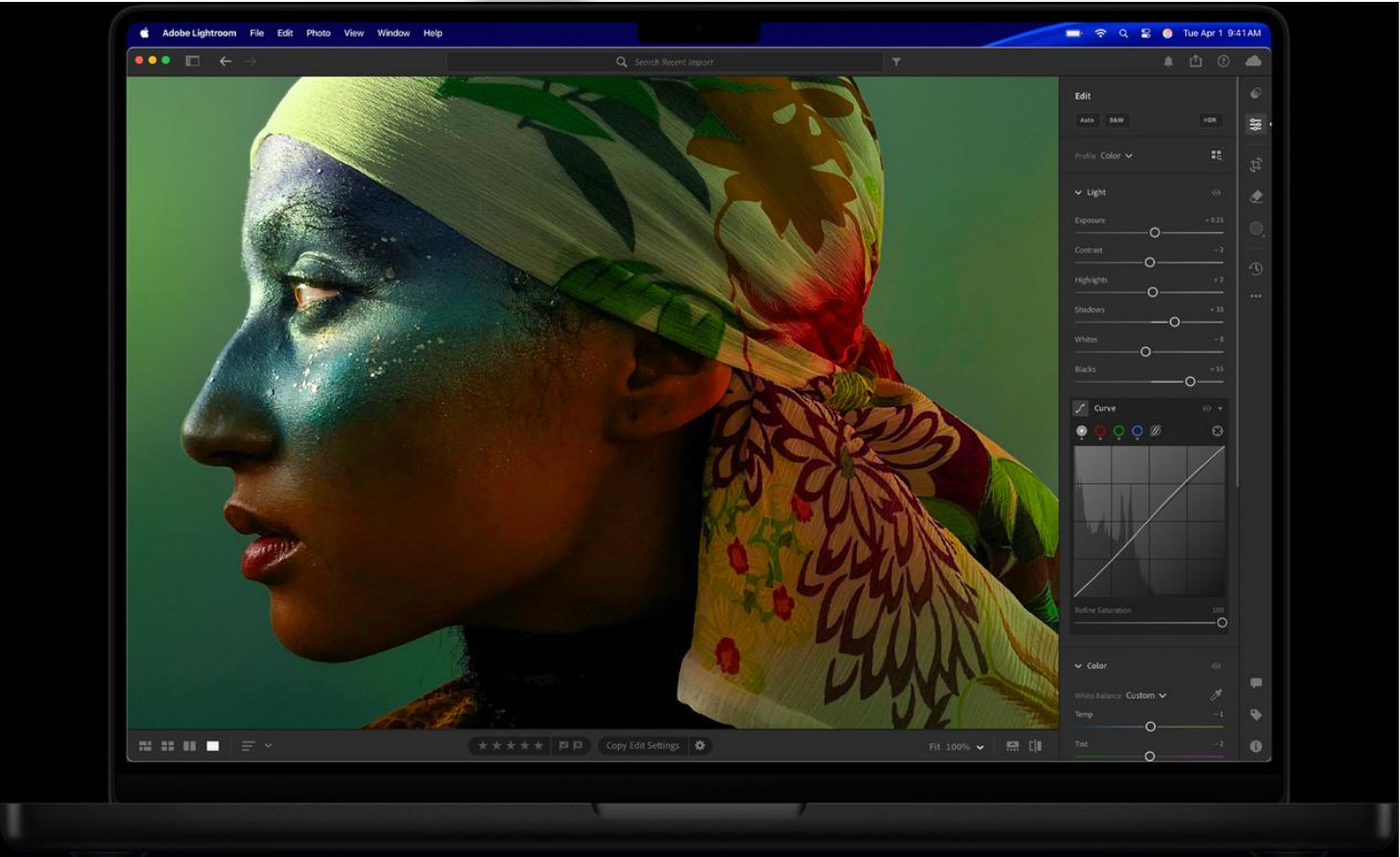
A laptop’s display can make a major difference for people who spend hours reading, editing photographs, watching videos or designing graphics.
The 14-inch MacBook Pro features Apple’s Liquid Retina XDR display, designed to deliver high contrast, rich colours and strong brightness.
Apple lists the following display highlights:
- 14-inch display.
- Liquid Retina XDR technology.
- Up to 1,600 nits peak HDR brightness.
- 1,000,000:1 contrast ratio.
- Optional nano-texture finish to reduce reflections and glare.
The high contrast ratio helps dark areas appear deeper while bright elements remain vivid. This can be useful when editing HDR video, viewing high-quality photographs or watching compatible films.
For photographers and designers, a good display is particularly important because it allows them to inspect details and make more informed colour and brightness adjustments.
The optional nano-texture display may be worth considering for people who frequently work in bright environments, although its additional cost and suitability should be checked before ordering.
Students and office users can also benefit from the screen’s sharp text and spacious working area, particularly when reading documents or keeping multiple windows open.
5. Battery Life and Charging
Battery life is one of Apple’s headline claims for the new M6 MacBook Pro.
Apple advertises up to 24 hours of battery life, making it an appealing option for people who work away from a desk, attend meetings or travel regularly.
Actual battery life depends on several factors, including screen brightness, applications, wireless activity, video playback, external accessories and the intensity of the workload. Heavy video editing or sustained AI processing may consume more power than ordinary web browsing.
The laptop also supports fast charging. Apple says it can reach approximately 50% charge in around 30 minutes when paired with a compatible higher-wattage USB-C power adapter, such as its 96W adapter.
This is helpful when you need to recharge during a short break between meetings or classes.
For people who frequently travel, the combination of battery efficiency and fast charging can reduce the need to remain close to a power outlet.
6. Connectivity and Ports
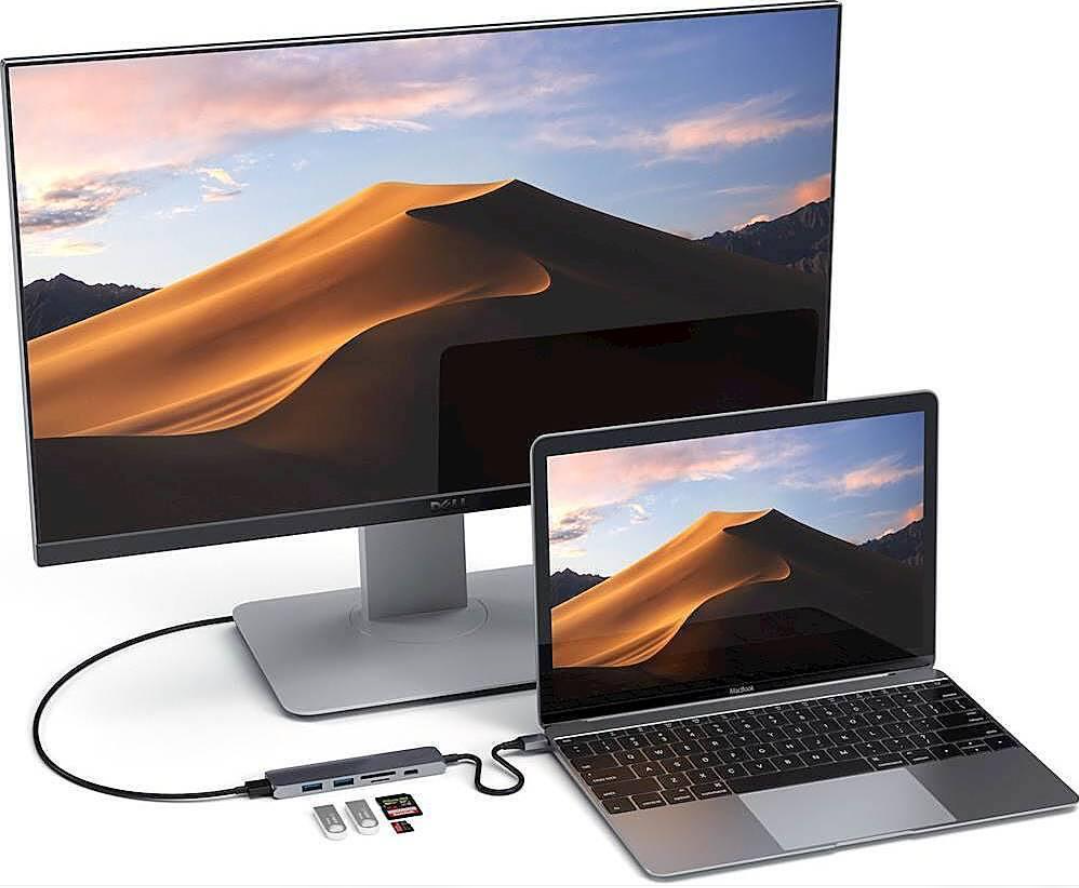
A professional laptop needs to connect to external displays, storage devices, cameras, headphones and other equipment without unnecessary complications.
The 14-inch MacBook Pro with M6 includes a useful selection of built-in connections:
| Connectivity feature | Details |
|---|---|
| Thunderbolt | Three Thunderbolt 4 ports |
| HDMI | Built-in HDMI port |
| Charging | MagSafe 3 |
| Memory cards | SDXC card slot |
| Audio | 3.5mm headphone jack |
| Wireless internet | Wi-Fi 7 |
| Bluetooth | Bluetooth 6 |
| External displays | Support for up to two external displays |
Wi-Fi 7 is intended to provide faster wireless networking and improved performance on compatible networks. Bluetooth 6 supports wireless connections with compatible accessories.
The Thunderbolt ports are useful for high-speed external storage, docks and other supported peripherals. HDMI makes it easier to connect the laptop to a compatible monitor or television, while the SDXC slot is particularly convenient for photographers.
The ability to connect two external displays can help professionals create a multi-screen workstation. Actual display resolutions and refresh rates depend on the monitors, connection method and supported configurations.
For many users, having these ports built into the laptop reduces the need to purchase additional adapters.
7. Camera, Microphones and Speakers
Video calls, online classes, remote meetings and content creation are now routine parts of computer use.
The M6 MacBook Pro includes a 12MP Center Stage camera with Desk View. Center Stage is designed to help keep the user framed during compatible video calls, while Desk View can show a view of the workspace or desk.
The laptop also features a three-microphone array designed for clear voice capture and a six-speaker sound system with Spatial Audio support.
These features can be useful for:
- Online meetings and interviews.
- Remote education and training.
- Video calls with clients.
- Recording voiceovers.
- Watching films and listening to music.
- Creating online content.
The built-in camera and audio equipment are convenient for everyday use. Professional creators may still prefer a dedicated camera, external microphone or studio headphones for specialised recording work.
8. Storage, Memory and Multitasking
Unified memory is an important consideration when buying a MacBook Pro because it is shared across the system’s CPU, GPU and other processing components.
The M6 model starts with 16GB of unified memory and can be configured with up to 32GB. Apple lists memory bandwidth of up to 170GB/s, depending on the configuration.
For ordinary productivity tasks, 16GB may be sufficient for many users. People who regularly work with large creative projects, multiple professional applications or demanding local AI workloads may benefit from choosing a higher-memory configuration.
Storage capacity should also be considered carefully. Apple lists the base configuration with 1TB of SSD storage.
A larger SSD is useful for storing high-resolution video, RAW photographs, software projects, games and offline files. Since professional laptops can be expensive to upgrade, it is sensible to estimate your storage requirements before purchasing.
If you mainly browse the web, write articles and work with cloud documents, the base configuration may be enough. Video editors and other professionals who manage large files should consider whether additional storage is worth the extra expense.
9. macOS 27 and Software Experience
The new MacBook Pro runs macOS 27, which brings Apple’s software ecosystem and supported Apple Intelligence features to the laptop.
The operating system is designed to work closely with the M6 hardware, helping applications take advantage of its CPU, GPU and Neural Engine.
The Mac is also useful for people who own other Apple devices. Compatible Continuity features can help users move files, share photographs, transfer tasks and work across their Mac and iPhone.
For developers, Xcode provides tools for building and testing Apple-platform applications. Creative professionals can use compatible applications for video editing, graphic design, photography, animation and music production.
Compatibility should always be checked before switching from Windows. Some specialist applications, enterprise tools and games may not offer the same experience on macOS.
Windows users who depend on specific software should confirm that a native Mac version or a suitable alternative is available before purchasing.
10. Price and Availability
Apple has announced the following starting price for the 14-inch MacBook Pro with M6:
| Detail | Information |
|---|---|
| Starting US price | $1,999 |
| Education starting price in the US | $1,899 |
| Pre-orders | October 28, 2026 |
| Expected availability | November 6, 2026 |
| Available finishes | Space Black and Silver |
These are US prices announced by Apple. Local prices may differ because of taxes, import costs, currency exchange rates, retailer margins and regional availability.
Buyers in India, Tanzania and other markets should check Apple’s regional website or an authorised reseller for the final local price and warranty terms.
The starting price is for the base configuration; higher memory and storage options can increase the total cost. Accessories and certain display options may also cost extra.
Because this is a premium laptop, buyers should compare the final price against their actual requirements rather than choosing the most expensive configuration automatically.
11. Who Should Buy the M6 MacBook Pro?
Students and university users
Students who work with research documents, presentations, coding tools and creative applications may appreciate the display, battery life and portability. However, those who only need a laptop for basic coursework may find a less expensive MacBook or Windows laptop more economical.
Content creators and video editors
The powerful GPU, XDR display, fast storage and extensive connectivity make the M6 MacBook Pro worth considering for demanding creative workflows. Performance will vary according to the application and the complexity of the project.
Developers and programmers
Developers may benefit from CPU performance, unified memory and Apple’s software-development ecosystem. Those building applications for Apple platforms can also take advantage of Xcode and other compatible tools.
Business professionals
Business users may value the premium construction, long advertised battery life, video-call features and ability to connect external monitors.
AI enthusiasts
Users interested in compatible local AI tools may benefit from the Neural Engine and GPU accelerators. Before buying, they should confirm that their preferred models and applications support Apple silicon and the available memory capacity.
12. Advantages and Disadvantages
Advantages
- Powerful M6 processor with a 12-core CPU and 12-core GPU.
- Improved graphics and AI performance compared with M5, according to Apple.
- High-quality Liquid Retina XDR display.
- Advertised battery life of up to 24 hours.
- Wi-Fi 7 and Bluetooth 6 connectivity.
- Useful built-in ports, including HDMI and an SDXC card slot.
- Strong camera, microphone and speaker features.
- Compact 14-inch design with a premium aluminium enclosure.
Disadvantages
- High starting price compared with many mainstream laptops.
- More memory and storage can substantially increase the cost.
- Some specialist Windows applications may not be available for macOS.
- The advertised maximum battery life may not reflect demanding real-world workloads.
- AI features and third-party applications vary by language, region and software support.
- The base model may not suit every professional workflow requiring extensive memory or storage.
Overall, the strongest reasons to consider the laptop are its combination of performance, display quality, battery efficiency and connectivity. The biggest concerns are its premium cost and whether the buyer genuinely needs this level of hardware.
13. M6 MacBook Pro vs an Older MacBook Pro
Whether an upgrade makes sense depends largely on the Mac you currently own.
If you use an Intel-based Mac: The M6 model could provide a major change in performance, battery efficiency and access to modern Apple silicon features.
If you use an M1 MacBook Pro: The upgrade may be attractive if you work with AI applications, 3D graphics, large creative projects or other demanding software. Users with basic needs may not need to upgrade immediately.
If you already own an M5 MacBook Pro: The decision is more difficult. The M6 introduces faster graphics, updated AI processing and newer wireless connectivity, but the value of upgrading depends on whether those improvements solve a real problem in your daily workflow.
If you are buying your first Mac: Consider your software requirements, memory needs, storage capacity and total budget. The right laptop is the one that supports your work comfortably without unnecessary spending.
14. Is the 14-inch MacBook Pro with M6 Worth Buying?
The 14-inch MacBook Pro with M6 looks like a compelling premium laptop for people who need strong computing performance in a portable design.
Its 12-core CPU, 12-core GPU, dedicated AI hardware, Liquid Retina XDR display and advertised battery life of up to 24 hours give it a broad range of potential uses, from software development and video editing to business productivity and compatible AI workflows.
However, the starting price of $1,999 means it is not the right choice for every buyer. People who mainly use a browser, office applications and video streaming may not benefit enough to justify the expense.
For professional creators, developers and users upgrading from significantly older Macs, the M6 MacBook Pro deserves serious consideration. For existing M5 owners, the decision should depend on the practical benefits of the newer hardware rather than the generation number alone.
Before purchasing, check the regional price, configuration options, software compatibility and warranty coverage.
Final Verdict
The Apple 14-inch MacBook Pro with M6 combines next-generation processing hardware, improved AI capabilities, a premium display and versatile connectivity in a compact professional laptop.
It is particularly appealing to users who need a reliable machine for demanding creative work, software development, business tasks and compatible AI applications. Its high price remains the main drawback, so buyers should carefully consider their requirements before upgrading.
For News Orbit Wave readers looking for a premium laptop in 2026, the M6 MacBook Pro is an important new option to compare against other high-performance computers.
Publisher: News Orbit Wave
Disclaimer: This article is for informational purposes. Specifications, performance claims and US pricing are based on Apple’s published announcement and may vary by configuration and market. Performance figures are manufacturer claims, not independent test results. News Orbit Wave is not affiliated with or endorsed by Apple Inc.